Personalise Every Message Automatically
Using %string1%, %string2% placeholders in your message template, iSMS replaces each tag with the corresponding value from your CSV file for each recipient — delivering a unique, personalised message to every contact.
Create your CSV file in the correct format
Column 1 = mobile number (with country code e.g. 60164502380), Column 2 onwards = your personalised data fields (string1, string2, etc.).
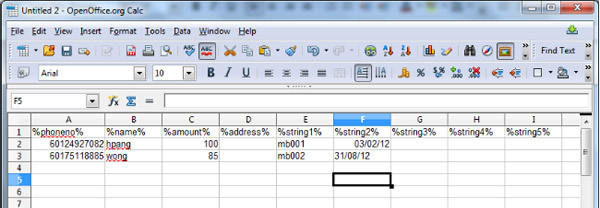
Map your fields — string1, string2, etc.
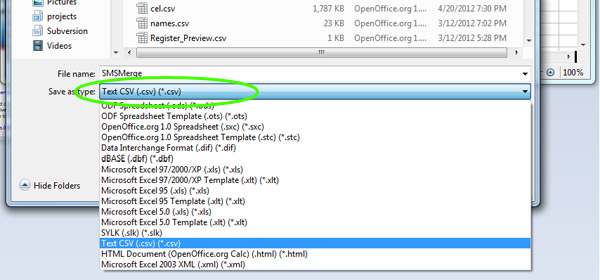
string1 will be replaced by the value in column 2, string2 by column 3, and so on. Save the file as .csv.
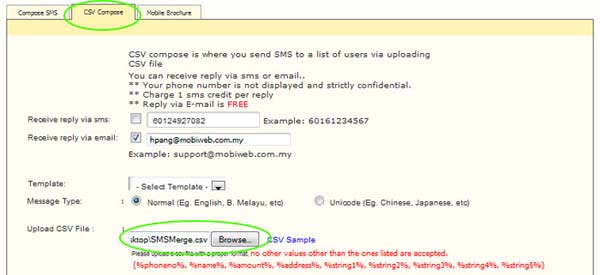
Login to iSMS → Compose SMS → CSV Compose tab
Go to your iSMS member portal, navigate to SMS → Compose SMS, then select the CSV Compose tab.
Upload your CSV and write your message template
Upload the CSV file, then write your message using the %XXXX% placeholders — e.g. "Dear member, your membership no. is %string1% and expires on %string2%."
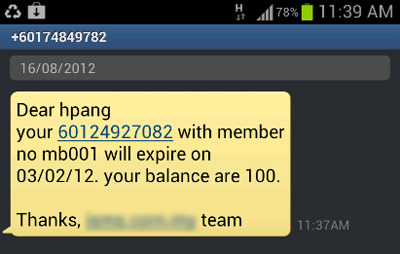
Send — each recipient receives their unique message
Review the preview and click Send. Each contact in your list receives a personalised SMS with their own data substituted in.
Need Help?
Contact our team — we'll guide you through setup and integration.