iSMS Reply URL Feature
Enable your SMS recipients to reply to your messages via a web form — with unlimited reply length and full tracking. Free on supported destinations. Not available for Malaysia, or for any destination whose operators do not support URLs in SMS.
Mobile operators in Malaysia do not support URLs or links inside SMS messages, so the Reply URL cannot be used for Malaysian numbers. The same restriction applies to any other destination country whose operators do not allow links in SMS.
If Malaysia is your destination, use WhatsApp Business API (WABA) instead — it supports clickable links, buttons and full two-way conversation, with confirmed handset delivery status. See Sending Links via WABA for details.
Contact us to confirm whether Reply URL is supported for the destinations you send to.
On destinations where URLs in SMS are supported, the Reply URL feature is included free with your SMS. Simply tick "Add Reply URL to message" when composing — no additional credits or charges apply for the URL link or feedback emails.
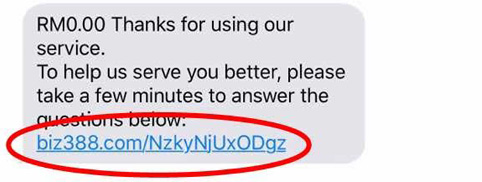
How Does the SMS with Reply URL Look?
Your recipient receives an SMS with a short link embedded in the message. By clicking the link, they are taken to a simple feedback form where they can type and submit their reply — even with long text or detailed descriptions.
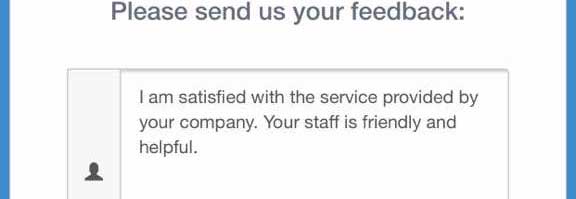
How to Reply to the URL
The link opens a mobile-friendly feedback form. Recipients can enter their comment, feedback, or any text into the form and click Submit — easy and convenient with no character limit on replies.
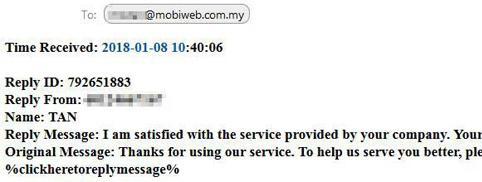
What the Administrator / Sender Sees
After customers reply, you can view all responses in your SMS history or via email. Each reply shows:
- Time received
- Phone number of the respondent
- Contact name (from address book)
- Full reply message
- Original message sent
Can Customers Reply to a Custom Form?
Yes — iSMS can help you insert a custom form into your SMS so users can reply to exactly your needs. Customers currently use this for shipment tracking, maintenance feedback, general surveys, staff check-ins, and more.
How to Enable Reply URL When Composing SMS
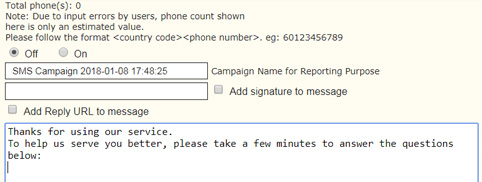
Step 1
Proceed to the compose iSMS page and insert your recipient details and message content as usual.
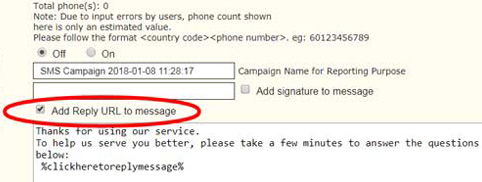
Step 2
Place the cursor at the location in the message where you want the Reply URL inserted. Tick "Add Reply URL to message" — the URL is automatically added to your message. Press Send Now or Send Later.
Step 3
Your iSMS will now be sent with the Reply URL, and recipients can give their feedback via the link at no additional charge. The tickbox has no effect for Malaysia or other destinations that do not support URLs in SMS.