How to Apply for WhatsApp Business API Blue Tick Verification
Obtaining the WhatsApp Business API Blue Tick Verification significantly enhances your business's credibility and trust. The 🔵 blue tick badge signifies that WhatsApp has authenticated your business — customers recognise your account as verified and legitimate.
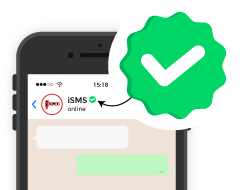
What is WhatsApp Business API Blue Tick Verification?
The WhatsApp Business API Blue Tick Verification is a verification badge provided by WhatsApp to authentic businesses. This blue tick appears next to your business name, indicating to customers that your business account is verified and legitimate — a mark of authenticity that helps build trust and improves customer engagement.
Benefits of Blue Tick Verification

🤝 Increased Trust
Customers are significantly more likely to open, read, and respond to messages from a verified business account.

⭐ Enhanced Credibility
Stand out from competitors — your brand name replaces the phone number, instantly signalling authenticity.

📈 Improved Engagement
Higher message open rates and response rates due to increased customer confidence in your verified brand.
Eligibility Criteria
Before applying for Blue Tick Verification, ensure your business meets all three of the following criteria:

WhatsApp Business API Account
Your business must already be using the WhatsApp Business API (WABA). Contact iSMS to get set up first.

Complete Business Profile
Your business profile must be fully updated with accurate name, description, website, and contact details.

WhatsApp Policy Compliance
Your business must fully adhere to WhatsApp's Commerce Policy and Business Policy — no violations allowed.
5 Steps to Apply for WhatsApp Blue Tick Verification
Follow this step-by-step guide to apply for the WhatsApp Business API Blue Tick Verification through the Meta Facebook Business Manager.

Set Up Your WABA Account
You can register your WhatsApp Business API account through iSMS as your WhatsApp Business Solution Provider (BSP):
- Registration: Contact iSMS to register your business and obtain WABA access.
- Phone Number Verification: Verify your business WhatsApp number.
- Profile Completion: Fill in your business profile with complete and accurate information.

Ensure Policy Compliance
- Review and ensure your business fully complies with WhatsApp's Commerce Policy and Business Policy.
- Any violations can lead to rejection of your verification request — or account suspension.
- Ensure your website is live, professional, and matches your WhatsApp Business profile information.

Apply via Meta Business Manager
To apply for Blue Tick Verification through Meta Facebook Business Manager:
- Business Verification: Ensure your business is verified in Facebook Business Manager (Security Center).
- Go to WhatsApp Manager → select your phone number → Settings → "Request official business account".
- Provide business name, category, and region. Submit proof of business registration and proof of address.
- Wait for Approval: Review takes a few days to several weeks. iSMS can assist throughout.

Review & Approval Process
- WhatsApp will review your application — typically within a few days to a few weeks.
- During this period, ensure your business remains compliant with all WhatsApp policies and guidelines.
- You may be asked to provide additional documentation — respond promptly to avoid delays.

Verification & Badge Display
- If your application is approved, the 🔵 blue tick will appear next to your business name on WhatsApp.
- Your display name is shown instead of your phone number on all outgoing messages.
- Congratulations — your business is now officially verified on WhatsApp!
✅ Tips for a Successful Application
- Accurate Information: Ensure all information provided is accurate, complete, and up to date.
- Strong Online Presence: Maintain a professional website, active social media, and consistent branding.
- Policy Compliance: Adhere strictly to WhatsApp's policies and guidelines at all times.
- Business Registration: Provide your Malaysia SSM or relevant business registration documents.
- iSMS Support: As your BSP, iSMS can guide and assist your application from start to finish.

⚠️ Common Reasons for Rejection
- Incomplete Information: Missing or incorrect details in the verification application.
- Policy Violations: Non-compliance with WhatsApp's Commerce or Business policies.
- Insufficient Documentation: Not providing required business registration or address proof.
- Weak Online Presence: No professional website or inactive social media accounts.
- Business Verification Incomplete: Meta Business Manager not yet verified before applying.

🔵 Start Your Blue Tick Verification with iSMS
Applying for WhatsApp Business API Blue Tick Verification can significantly boost your business's credibility and customer trust. As an official WhatsApp Business Solution Provider (BSP), iSMS is here to guide you through every step of the application process — from WABA setup to blue tick approval.