📤 CSV Compose SMS
Send personalised bulk SMS to your contact list via CSV upload — no coding required. Step-by-step portal guide.
How to Send CSV Compose SMS via iSMS Portal
Use CSV Compose to send personalised bulk SMS to a list of contacts in one go — no coding required.
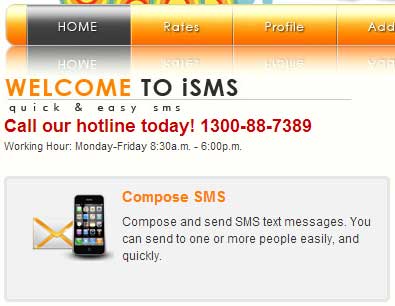
Login to your iSMS account and go to Compose SMS → CSV Compose.
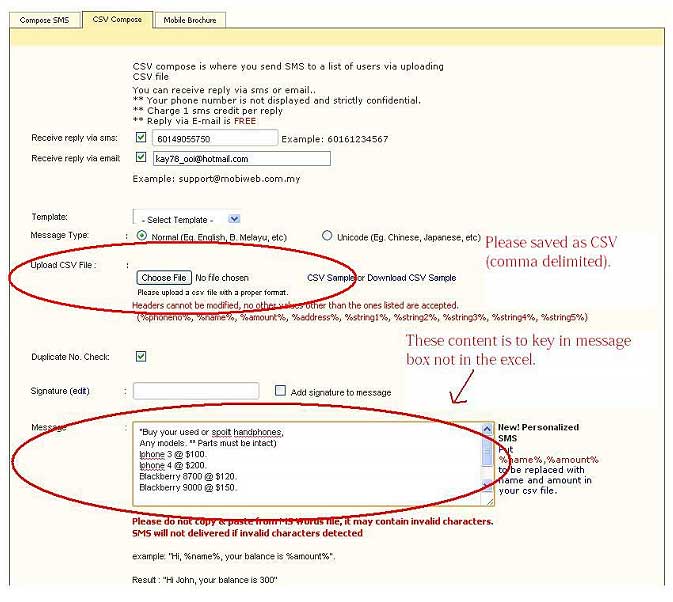
Fill in your details, upload your CSV file, write your message using placeholders (e.g. %name%), then click Send Now.
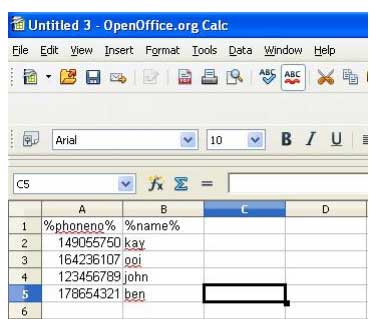
Prepare your CSV with these accepted column headers: %phoneno%, %name%, %amount%, %address%, %string1% … %string5%. Column A must be phone numbers.
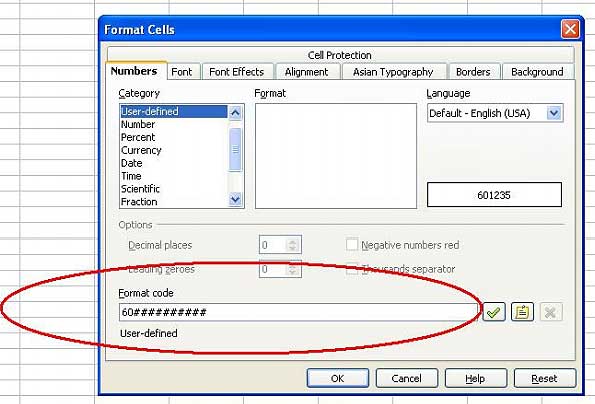
Select the phone number column (Column A), right-click → Format Cells. Set the format to 60########## to preserve full country-code numbers.
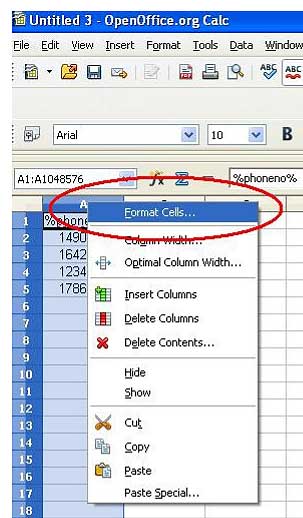
Set format code to 60########## and click OK. Save the file as CSV. Then return to Step 2 and upload.
Need Help Getting Started?
Contact our team — we reply within 1 business day.